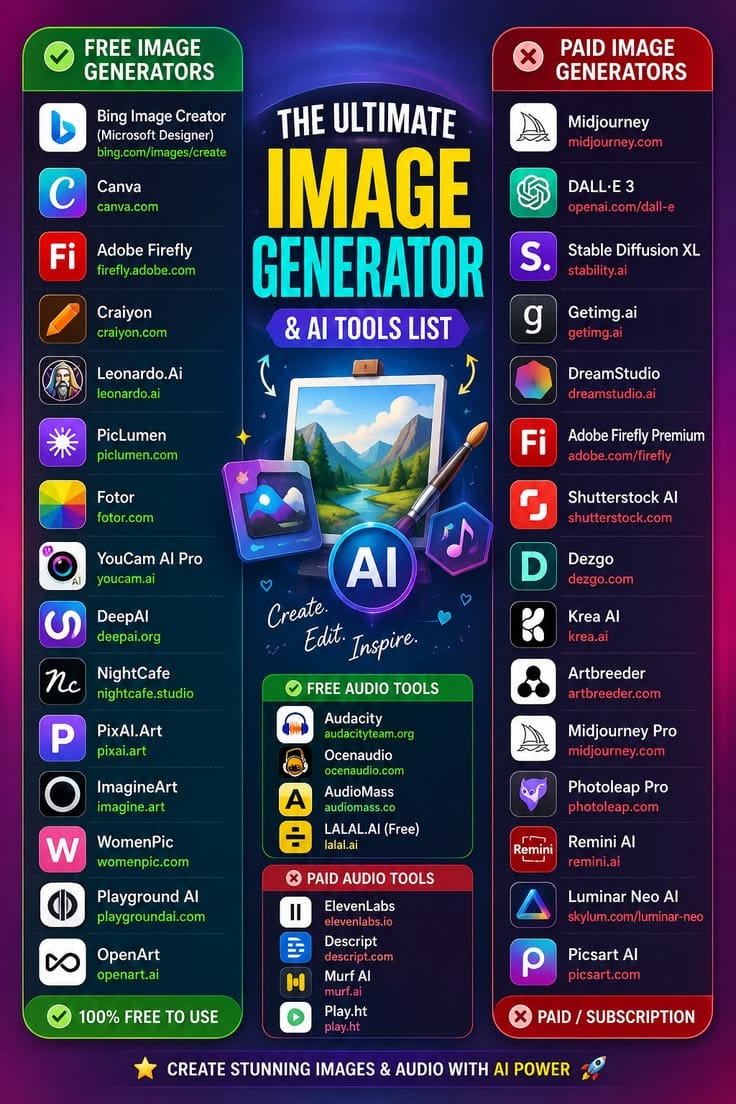
Type a description like "a lighthouse at sunset painted in watercolor style" into an AI image generator, and within seconds you get a finished visual that matches the request. It's one of the more visibly impressive uses of AI for everyday people, and free tools have gotten good enough that most casual and even semi-professional needs no longer require a paid subscription. This guide breaks down how these tools actually work, which free options are worth trying in 2026, and how to get results that don't look obviously AI-generated.
What Are AI Image Generators?
AI image generators are tools that turn a written description — called a prompt — into an original image. Unlike a search engine, they don't pull an existing picture from somewhere on the web. Instead, they build a brand-new image pixel by pixel based on patterns learned during training. That's why two people can type nearly identical prompts and get visibly different results — the model is generating, not retrieving.
How It Works, Without the Jargon
These systems are trained on huge collections of images paired with text descriptions. Over that training, the model learns associations between words and visual patterns — what "watercolor" tends to look like, what a "lighthouse" is generally shaped like, how "sunset" affects color and lighting. When you type a new prompt, the model builds an image from scratch that fits those learned patterns, rather than copying and pasting an existing picture. Most modern tools use a technique called diffusion, where the model starts with random visual noise and gradually refines it, step by step, into a coherent image that matches your text.
Best Free AI Image Generators in 2026
Pricing and free-tier limits on these tools change often, so it's worth checking each provider's current terms before relying on one for ongoing work. That said, a few categories of free tools consistently stand out:
Built-in browser and search assistant tools
Several major search engines and browser assistants now include free image generation directly in their chat interface, with no separate sign-up needed. These are usually the fastest way to try image generation for the first time, though daily generation limits are common.
Dedicated AI art platforms with free tiers
A number of standalone platforms built specifically for AI art offer a free plan with a capped number of generations per day or month. These tend to give more control over style, aspect ratio, and iteration than browser-based tools, making them a better fit for anyone doing repeated creative work.
Open-source models run through free web interfaces
Some of the underlying AI models behind image generation are open-source, meaning developers have built free, ad-supported, or donation-based websites that let anyone use them without installing anything. Quality varies by interface, but this route often has the most generous free usage.
Getting Better Results: Prompt Tips
The same principle from writing text prompts for chatbots applies here: specificity helps. Mentioning lighting, color palette, composition, and style produces far more usable results than a one-line description. A prompt like "a cat" will give you something generic; a prompt like "a orange tabby cat sitting on a windowsill, soft morning light, shallow depth of field, photorealistic" gives the model far more to work with.
Many people also generate several variations and pick the best one rather than expecting perfection on the first try. Treating the first result as a draft — then adjusting the wording based on what came out — usually gets to a usable image faster than trying to write the perfect prompt upfront.
Practical, Everyday Uses
- Mocking up concepts for a design project before committing time to it
- Creating unique visuals for blog posts and social media without stock photo fees
- Generating quick variations of a logo or icon concept
- Visualizing a scene for a story, game, or presentation
- Producing placeholder or draft imagery for a website before final assets are ready
Free vs. Paid: What Actually Changes
Paid tiers on most platforms typically unlock higher resolution output, faster generation times, fewer daily limits, and sometimes commercial usage rights that the free tier doesn't include. For casual use — social posts, personal projects, quick mockups — free tiers are usually enough. For client work or anything published at scale, it's worth reading the specific license terms, since "free to generate" and "free to use commercially" are not always the same thing.
Limitations Worth Knowing About
As these tools mature, they're becoming less of a novelty and more of a genuine step in creative workflows — useful for exploring ideas quickly, even when a human designer refines the final result. That said, they still struggle with a few consistent problem areas: rendering readable text inside an image, drawing hands and fingers accurately, and keeping small details consistent across multiple generations of the "same" subject. Knowing these weak spots ahead of time saves time — if you need clean text in an image, it's usually faster to generate the background and add text separately in an editor.
Frequently Asked Questions
Can I use AI-generated images commercially?
It depends on the specific tool's license and, in some jurisdictions, on unresolved legal questions about copyright ownership of AI-generated work. Always check the terms of service of the specific generator before using an image in a commercial project.
Why do AI images sometimes get hands or text wrong?
These models learn patterns from pixels, not an understanding of anatomy or language. Hands have many overlapping, variable shapes, and text requires precise character-level accuracy — both are still genuinely hard for diffusion-based models to get consistently right, though newer versions have improved.
Do these tools "understand" what they're drawing?
Not in the way a human illustrator does. They predict statistically likely pixel patterns based on your prompt and training data, which is why oddly specific or unusual prompts can produce unexpected results.
Are free AI image generators good enough for professional work?
For drafts, mockups, and internal use, often yes. For final client-facing or commercial assets, it depends on resolution needs and licensing — many professionals use free tools for ideation and a paid tier or human designer for the finished product.
What's the difference between AI image generators and photo editing apps?
Photo editing apps modify an existing image you provide. AI image generators create a brand-new image from a text description with no starting photo required, though many modern tools now blend both approaches, letting you generate an image and then edit or extend it.
How do I stop my images from looking "obviously AI"?
Adding specific, concrete details — real camera and lighting terms, specific art styles, realistic imperfections — tends to help. Generic prompts produce generic, easily-recognizable AI output, while highly specific prompts push the model toward less predictable, more natural-looking results.